![derivita-logowhite (2).png]](https://support.derivita.com/hs-fs/hubfs/derivita-logowhite%20(2).png?height=25&name=derivita-logowhite%20(2).png)
This guide shows you how to type common math expressions so the computer understands them exactly as you intended.
| Section | What's inside? |
| Basics | Understanding the Toolbar, Preview Window, and Invalid Input errors. |
| Syntax Guide | How to type fractions, exponents, roots, and special symbols. |
| Topics & Logic | Specialized formatting for Intervals, Matrices, and Inequalities. |
| Completing your Assignment | How to use attempts, "Try Similar," and submit your final work. |
1. Fractions and Mixed Numbers
-
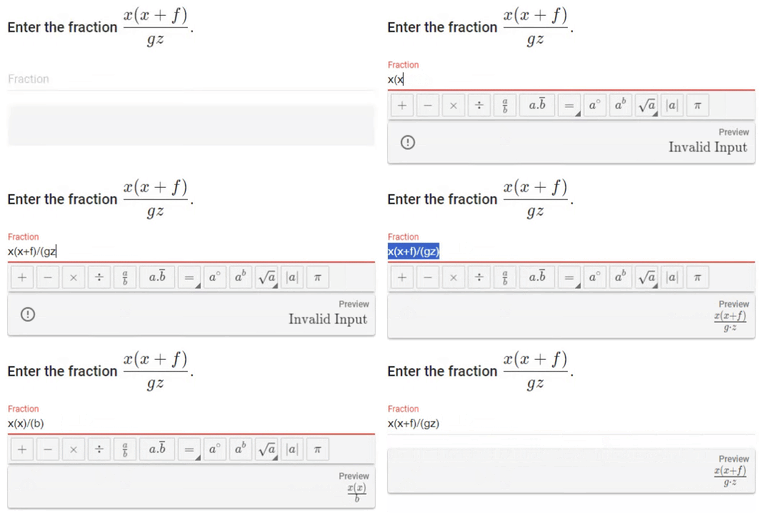
Basic Fractions: Type
/for the division bar.-
Example: Type
1/2.
-
-
Complex Fractions: If the top or bottom of your fraction has more than one symbol, wrap that part in parentheses.
-
Example: Type
(a+b)/(c+d).
-
-
Mixed Numbers: Leave a single space between the whole number and the fraction.
-
Example: Type
3 1/2.
-
2. Exponents and Powers
-
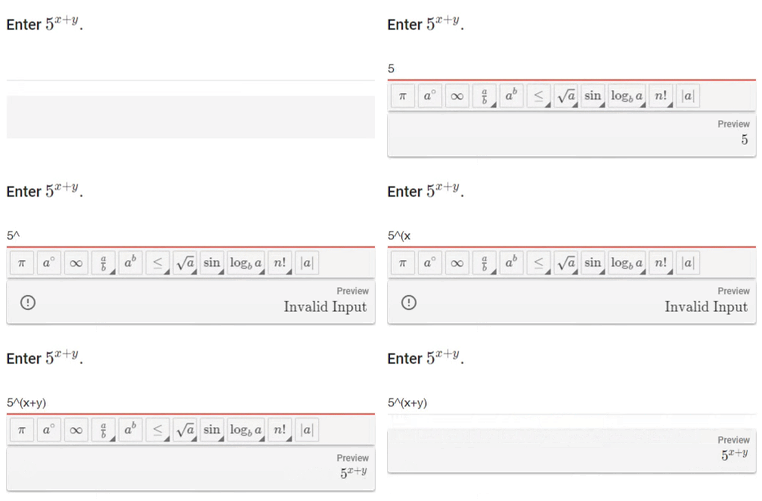
Basic Powers: Use the
^symbol (Shift + 6) to "raise" a number to a power.-
Example: Type
a^b.
-
-
Grouped Exponents: If your exponent contains more than one symbol or a math operation, wrap the entire exponent in parentheses.
-
Example: Type
a^(b+c).
-
-
Fractional Exponents: Put the fraction inside parentheses.
-
Example: Type
a^(1/2).
-
3. Roots and Radicals
-
Square Roots: You can click the √ icon on the toolbar or type
sqrt(...).-
Example: Type
sqrt(x-y).
-
-
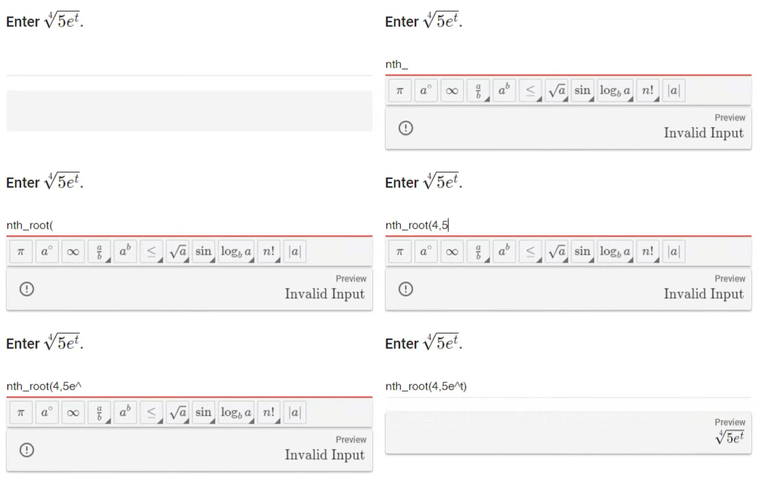
n-th Roots: Use the toolbar icon
 or type
 nth_root(index, expression).-
Example: Type
nth_root(3, 8).
-
4. Special Symbols and Shortcuts
| To get this... | Type this... | Notes |
| Plus or Minus (±) | + , - |
Type the "plus" version, a comma, then the "minus" version. |
| Absolute Value |-x| | abs(-x) |
Type abs, open parenthesis, the value, then closed parenthesis |
| Degree Symbol (°) | deg |
Type deg after the number (e.g., 90deg). |
| Ratio/Odds (2:5) | : |
Type a colon between the numbers. |
| Repeating Decimal | ^_ |
Follow the format 1.3^_3. |
| Pi (π) | pi |
Type the letters "pi" |
| Infinity Symbol (∞) | infinity |
Type the word "infinity" |
5. Parentheses Matter
The computer is very literal. If your preview window shows a layout you didn't want, it almost always means you need more parentheses.
-
Typing
sqrt x + 2would display ass⋅q⋅r⋅t⋅x+2 -
Typing
sqrt(x + 2)ensures the whole expression is included.
Next → Entering your Answers in Derivita — by Topic
Still Stuck?
If you are having trouble with a specific problem and the formatting guide isn't helping, reach out to your instructor. Ask your teacher for help | Derivita Support Center