![derivita-logowhite (2).png]](https://support.derivita.com/hs-fs/hubfs/derivita-logowhite%20(2).png?height=25&name=derivita-logowhite%20(2).png)
Start from Home: the three questions your role asks most
Home is the first page you see when you sign in to Derivita Analytics. It's built around the questions people in your role ask most, scoped to your students, and each one opens the page that answers it.
Get there
- Sign in to Derivita Analytics. You land on Home.
- From anywhere in the app, click Home in the top bar to come back.
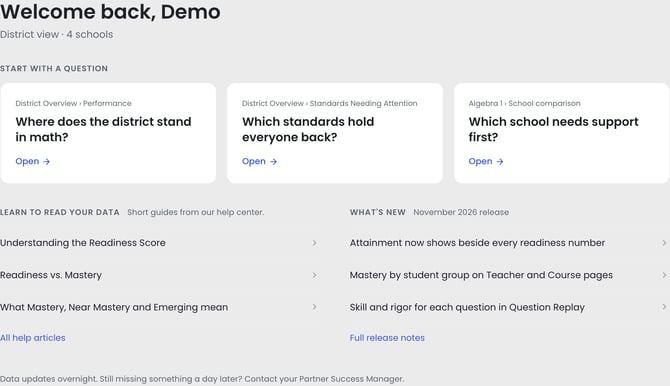
Home has four parts, top to bottom:
- Welcome line. Under your name is the scope you're seeing: District view · 4 schools for a district admin, your school's name for a principal, or your subjects and school for a teacher.
- Start with a question. Three cards, each a question your role asks most. The small label above each question shows where the card opens. Click Open to go straight there.
- Learn to read your data. Three short guides from this help center, chosen for your role. All help articles opens the full help center.
- What's new. Headlines from the latest release. Click one to see the change in the app, or open Full release notes.
The footer is a reminder that data updates overnight. If something is still missing a day later, contact your Partner Success Manager.
Your three questions, by role
|
Your role |
The questions on Home |
Where each one opens |
|---|---|---|
|
District admin / curriculum director |
Where does the district stand in math? · Which standards hold everyone back? · Which school needs support first? |
District Overview → Performance (click a subject such as Algebra 1 to see the standards holding everyone back) · your blueprint's School comparison |
|
Principal |
Where is my school strong or weak? · What's the full picture in your subject? · Which teachers need support first? |
Your school's Performance tab · your subject's page at your school, where Teacher Breakdown shows which teachers need support |
|
Teacher |
What do I reteach on Monday? · Which students need help? · Did my reteach work? |
Your Performance, Students and Assessment Comparison tabs, scoped to your classes |
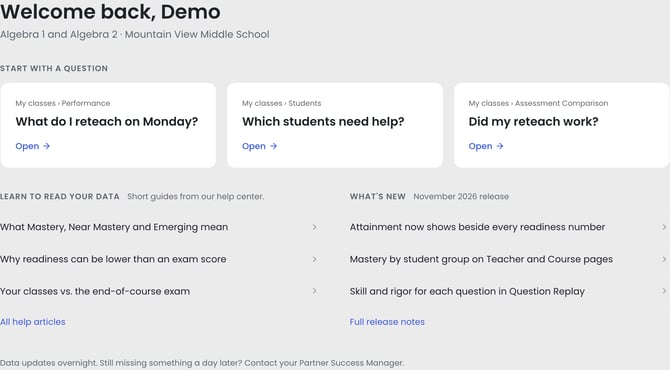
A teacher's Home. Each card opens a tab of your own Teacher dashboard, and the guides are the ones teachers ask about most: what Mastery, Near Mastery and Emerging mean, and why readiness can be lower than an exam score.
The one movePick the question you'd ask today and click Open. If you're new to Analytics, start with the guide marked Start here under Learn to read your data. It's a five-minute tour of where your role starts and how to read every number.
Related
- Start here: Derivita Analytics overview: what's in it and how to read it
- District: See where your district stands
- Principal: See where your school is strong and weak
- Teacher: What to do Monday: your reteach list
- Concept: Understanding the Blueprint Readiness Score