![derivita-logowhite (2).png]](https://support.derivita.com/hs-fs/hubfs/derivita-logowhite%20(2).png?height=25&name=derivita-logowhite%20(2).png)
For teachers: the Performance tab on your dashboard is your class, and only your class. Two clicks from login it tells you what to reteach next and which students to check on — no export, no pivot table.
Get there- Open your teacher dashboard (search your name in the sidebar, or open it from your school).
- You land on the Performance tab.
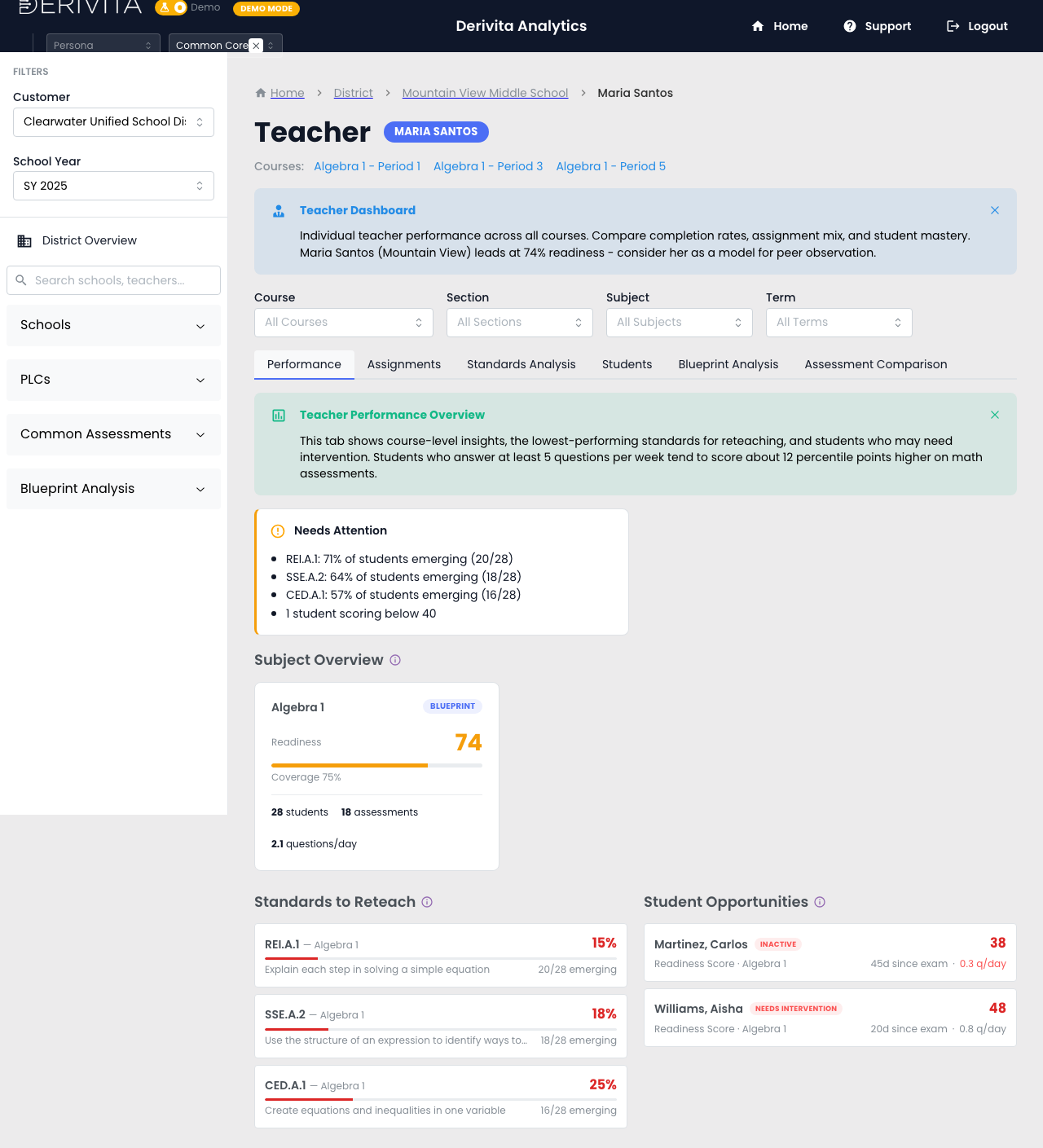 Teacher Performance — reteach list and student opportunities, scoped to your class
Everything here is your students — your Algebra 1 sections, never the school or district average.
- Subject Overview — your Algebra 1 class: Readiness 74, coverage 75%, your 28 students. (Algebra 1 is the blueprint/end-of-course subject — see why some subjects show Readiness vs Mastery.)
- Standards to Reteach — every standard ranked by how far your students are from mastery. The top of the list is Monday's lesson: REI.A.1 (explain each step in solving a simple equation) sits at 15% mastery — 20 of 28 students still emerging.
- Student Opportunities — the specific students to pull, not just a count: Carlos Martinez (readiness 38, flagged inactive — 45 days since his last exam) and Aisha Williams (48, needs intervention).
Work the top of the Standards to Reteach list first — it's the highest-impact reteach for your roster, already ranked. Then open Student Opportunities and check in with the two flagged students by name. That's your Monday, decided in under two minutes.
This view is scoped to your students and framed for support — it's your teaching tool, not an evaluation.
▶ VIDEO
Related- Concept: What is Blueprint Readiness?
- Reference: why some subjects show Readiness vs Mastery
- Drill in: How is this standard doing?