![derivita-logowhite (2).png]](https://support.derivita.com/hs-fs/hubfs/derivita-logowhite%20(2).png?height=25&name=derivita-logowhite%20(2).png)
How is this standard doing — and exactly who's behind on it
When a standard shows up on your reteach list, this is where you decide what to do about it. The Standard Detail page takes one standard from "students are struggling" to "these specific students, on these specific items."
Get there- From your Standards to Reteach list (or any standards view), click a standard — for example REI.B.3 (Solve linear equations and inequalities in one variable).
- You land on the standard's detail page.
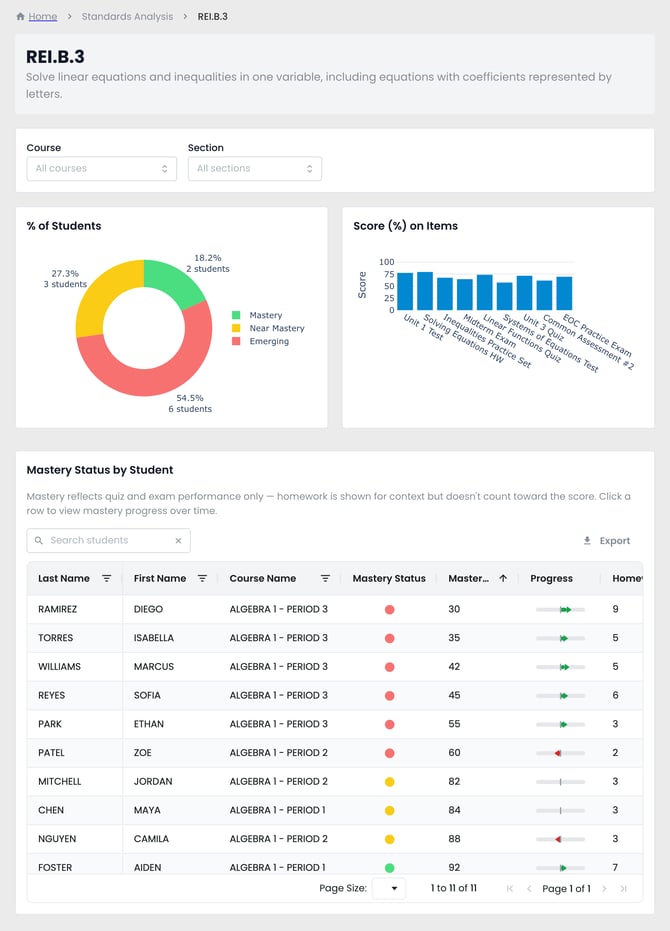
Three panels answer three questions:
- % of Students — the mastery split for this standard: 18.2% Mastery (2 students) · 27.3% Near Mastery (3) · 54.5% Emerging (6). Each slice names its student count, and the bands come straight from the scores in the student list below. More than half the students still emerging is your reteach case in one glance.
- Score (%) on Items — how students scored on each assessment that touched this standard, oldest to newest (Unit 1 Test → … → EOC Practice Exam). This is where you see whether they're climbing or stuck.
- Mastery Status by Student — every student's mastery on this standard, listed A–Z with a Search students box. Click the Mastery Score header to sort low to high and the students to pull rise to the top: Diego Ramirez (30), Isabella Torres (35), up to Liam Okafor (94).
Note the fine print: mastery reflects quiz and exam performance only — homework is shown for context but doesn't count toward the score. Click any student row to see their mastery progress over time.
The one moveSort by Mastery Score and the red (Emerging) students at the top are your small group for this standard — no roster hunting. Pull those students, reteach the standard, and re-check the item scores after the next assessment.
Related
- Comes from: What to do Monday — your reteach list
- Concept: What is Blueprint Readiness?
- Reference: why some subjects show Readiness vs Mastery