![derivita-logowhite (2).png]](https://support.derivita.com/hs-fs/hubfs/derivita-logowhite%20(2).png?height=25&name=derivita-logowhite%20(2).png)
For district admins: the Data Quality tab is the trust check — it shows the courses and users that have activity but aren't mapped, so you know exactly what's missing from the performance reports before you act on them.
Get there- Open District Overview.
- Click the Data Quality tab (and its neighbor, User Mapping).
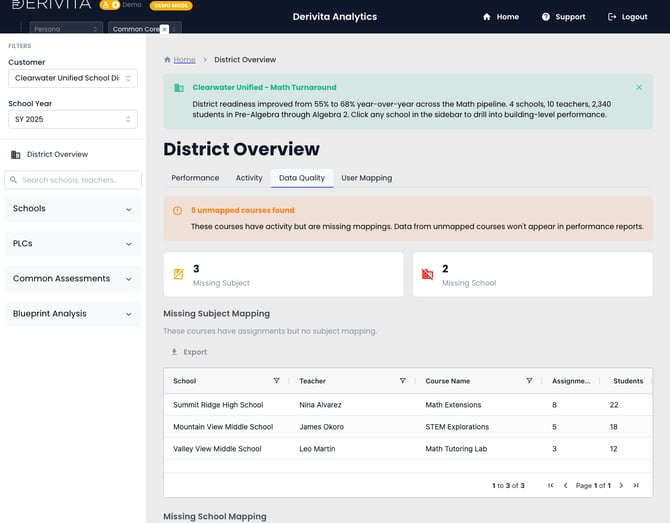 District Data Quality — unmapped courses missing subject or school
- The headline: 5 unmapped courses found — "these courses have activity but are missing mappings. Data from unmapped courses won't appear in performance reports."
- Broken out by what's missing: 3 Missing Subject, 2 Missing School. The Missing Subject Mapping table lists the specific courses so you can chase them down (and Export the list).
- User Mapping does the same for people — accounts that need to be tied to the right school or role.
Clear the unmapped list: assign each course its subject and school so its assignments flow into the reports. A low or surprising readiness number is often a mapping gap here, not a real performance dip — check this tab before you sound an alarm.
Related- The performance picture: Where's the district on math?
- Who's using it: Activity across the district