![derivita-logowhite (2).png]](https://support.derivita.com/hs-fs/hubfs/derivita-logowhite%20(2).png?height=25&name=derivita-logowhite%20(2).png)
For coordinators: the blueprint's Students tab is every student on the end-of-course blueprint — across every school — in one filterable list. It's where a district-level readiness number turns back into named students you can group and act on.
_Last updated: August 2026_
Get there
- Open the Algebra 1 EOC blueprint.
- Click the Students tab (next to Blueprint).
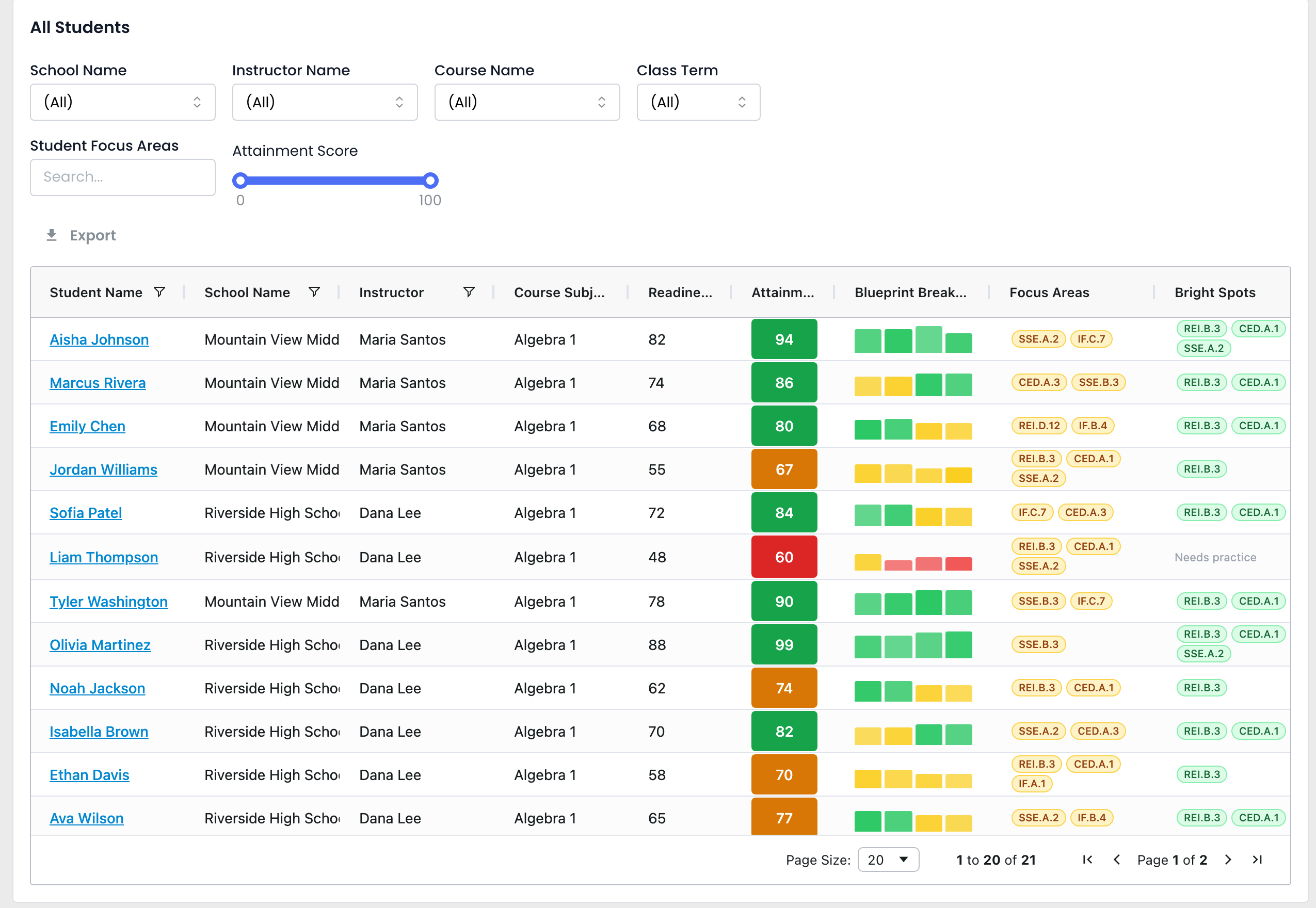 The blueprint Students tab — every student across schools with readiness, attainment, and a per-standard blueprint breakdown, plus filters
Read it in 30 seconds
- One row per student, spanning schools — here 21 students across Mountain View (Maria Santos) and Riverside (Dana Lee) — with Readiness, Attainment, and a Blueprint Breakdown strip showing per-standard mastery. Olivia Martinez (88) sits at the top; Liam Thompson (48) at the bottom.
- The filters are the point. The Attainment Score slider (0–100) isolates a band — drag the top down to 65 to focus on the students who haven't yet mastered what's been taught. The Student Focus Areas search finds everyone emerging on a specific standard. School / Instructor / Course narrow the scope.
- Unlike a teacher's own roster, this is the whole blueprint cohort, so you can build an intervention group that crosses classrooms and campuses — students who share a focus area but sit with different teachers.
The one move
Drag the attainment slider to isolate the below-65 students, or search a Focus Area standard to pull everyone stuck on it — that's your intervention group, already named and ready to Export. Click any student to open their full profile.
▶ VIDEO
Related- The subgroup view: Which student groups are furthest from ready?
- A teacher's own roster: Who needs help — every student in your class
- Drill into one: How is this student doing?