![derivita-logowhite (2).png]](https://support.derivita.com/hs-fs/hubfs/derivita-logowhite%20(2).png?height=25&name=derivita-logowhite%20(2).png)
How to access Question Replay
- Open Derivita Analytics
-
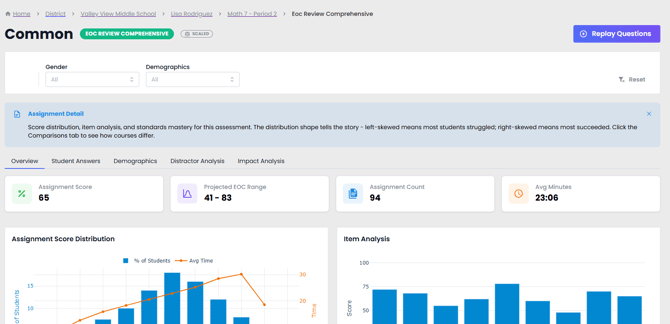
From a Course, PLC, or Common Assessment, select the assessment you would like to review.
-
Click Replay Questions button in the top-right corner.
You'll see a version of the questions included in the assignment. You can also click on the question bar directly from the Item Analysis to see the question replay.
What Does Question Replay Show?
Question Replay provides the following information:
-
A version of the question as it appears in the assignment
-
The associated standard(s) aligned to the question
-
Average time spent on the question and the average score
-
A breakdown of actual student responses, including whether each response is correct or incorrect
-
Insights and analytics related to the question to help guide instruction
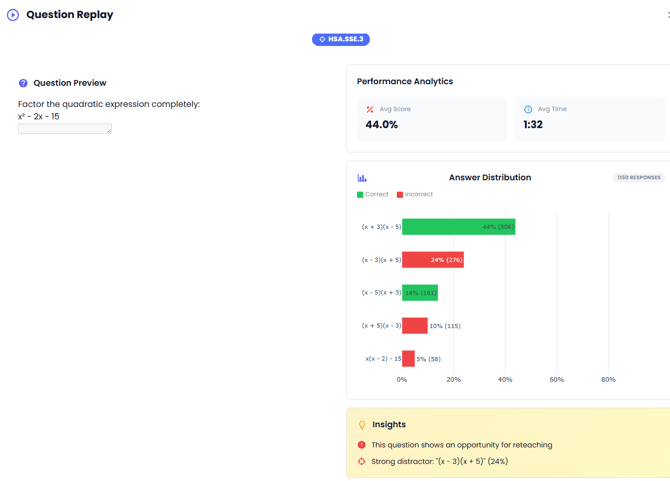
Use the question breakdown, including incorrect responses and provided insights, to identify potential distractors and common student misconceptions. Then, use SpotCheck to have students work through a similar problem in real time. This allows you to address misunderstandings immediately, discuss the reasoning behind correct solutions, and reinforce the underlying concepts