![derivita-logowhite (2).png]](https://support.derivita.com/hs-fs/hubfs/derivita-logowhite%20(2).png?height=25&name=derivita-logowhite%20(2).png)
For principals: the subject drilldown is one subject seen from every angle at once — how much is covered, how teachers compare, which subgroups are behind, and the students underneath — so you can move from "how's Algebra 1?" to a specific action without changing screens.
Get there- From your school or district view, click into a subject (e.g. Algebra 1).
- You land on the subject drilldown.
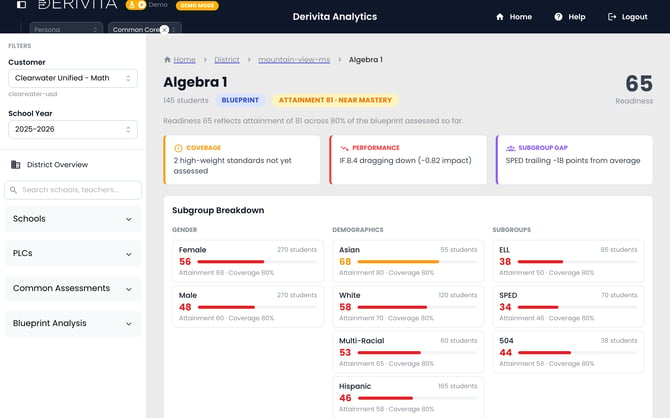
The page stacks the views you'd otherwise hunt for:
- The header — Readiness (65) with an Attainment 81 · Near Mastery badge and a caption: Readiness 65 reflects attainment of 81 across 80% of the blueprint assessed so far. Strong attainment with readiness below it means there's more blueprint to teach — a pacing read.
- Coverage and Performance — where the subject stands overall.
- Teacher Breakdown — the same subject across teachers/sections, so a strong section (to learn from) and a struggling one (to support) both stand out.
- Subgroup Breakdown — readiness by group, framed as coverage vs mastery gaps (groups of 5 or fewer students are hidden to protect student privacy).
- Assessment History and Students — the trend over time and the roster beneath the numbers.
Pair the Teacher Breakdown with the Subgroup Breakdown: the strongest teacher on a standard is your model; the widest subgroup gap is your target. That's a coaching plan and a support plan from one screen.
Related
- Your school overall: Where is my school strong or weak?
- One standard's detail: This standard across classrooms
- The equity view: Which groups are furthest from ready?