![derivita-logowhite (2).png]](https://support.derivita.com/hs-fs/hubfs/derivita-logowhite%20(2).png?height=25&name=derivita-logowhite%20(2).png)
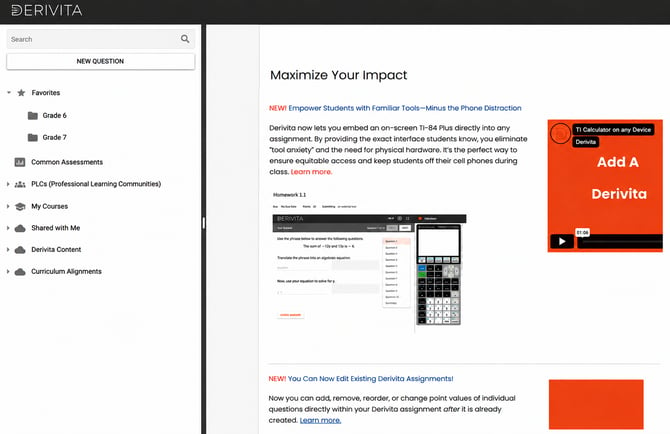
When you Favorite a book, it will automatically appear in the Favorites section at the top of Assignment Assembly. This means you no longer need to scroll through your full list of available books to find the content you use regularly.
How to Favorite a Book
To add a book to your Favorites:
- Open Assignment Assembly.
- Scroll to the book you would like to Favorite.
- Right-click on the title of the book.
- Select Add Favorite.
- The book will now appear under Favorites at the top of your Assignment Assembly screen.
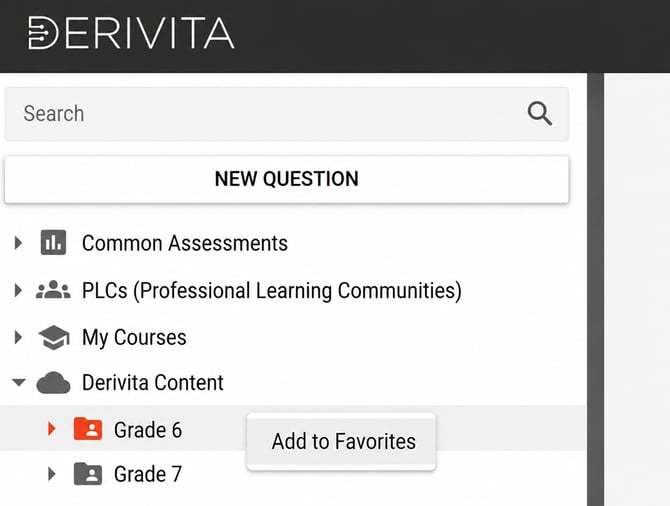
To remove a book from Favorites, simply right-click on the title and select "Remove from Favorites".
Why Favorite Books?
Favoriting books can help you build assignments more quickly and efficiently.
With Favorites, you can:
- Quickly access the books you use most often.
- Reduce the time spent scrolling through available content.
- Keep frequently used curriculum and resources at the top of your Assignment Assembly experience.
- Continue to access all available Derivita content whenever you need it.
Updates to Assignment Assembly
In addition to the new Favorites feature, Assignment Assembly has been streamlined to make building assignments easier and more efficient.
You will notice:
- Favorite books displayed at the top for quick access.
- Continued access to all Derivita content.
- Curriculum Alignments separated out for quicker and easier viewing.
Can't find a book you previously used? View our list of updated book names and locations here: https://support.derivita.com/book-reorg-assignment-assembly