![derivita-logowhite (2).png]](https://support.derivita.com/hs-fs/hubfs/derivita-logowhite%20(2).png?height=25&name=derivita-logowhite%20(2).png)
- “Your key and secret are incorrect” when the teacher opens it
- “This course hasn’t been set up yet.” when a student opens it
This happens because Canvas has added a second, broken configuration of Derivita to the course.
This article will help you remove the broken configuration and copy assignments in a different way:
Remove the broken configuration(s)
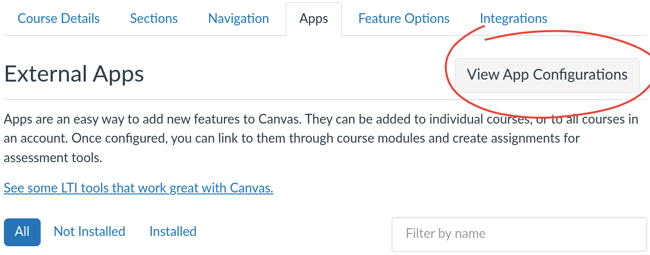
In your Canvas course, go to Settings > Apps, then click View App Configurations:
You’ll see a list of apps installed in the course. Due to the copying issue, you’ll see multiple apps named “Derivita”:
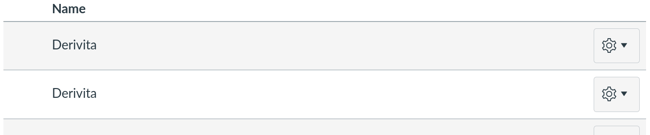
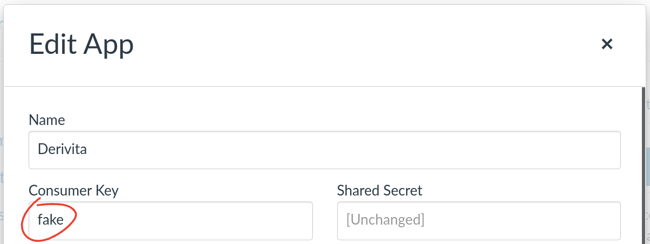
We need to remove any that have "fake" as their Consumer Key. For each row named “Derivita”:
-
Click the gear icon, then choose Edit (If there’s a lock icon instead of a gear, you’ll need to ask a Canvas admin to do these steps.)
-
Read the Consumer Key field and close the edit prompt
- If the key was “fake”, click the gear icon, the choose Delete
If the key was something else, leave that row as-is
Once you have only the original installation left, the copied assignments will open with no error.
Copy assignments another way
To avoid the issue, we recommend that affected teachers copy assignments by copying and pasting the external tool URL, instead of using Canvas’s copying features:
- Open the Canvas settings for the assignment you want to copy
- Copy the link under Enter or find an External Tool URL
It’ll start with https://homework.derivita.com/assignment/s/… - In the target course, start making a new assignment
- Set the Submission Type to External Tool
- Paste the link under Enter or find an External Tool URL