![derivita-logowhite (2).png]](https://support.derivita.com/hs-fs/hubfs/derivita-logowhite%20(2).png?height=25&name=derivita-logowhite%20(2).png)
To send a question or message to your teacher, click "Help" in the top right of any assignment.
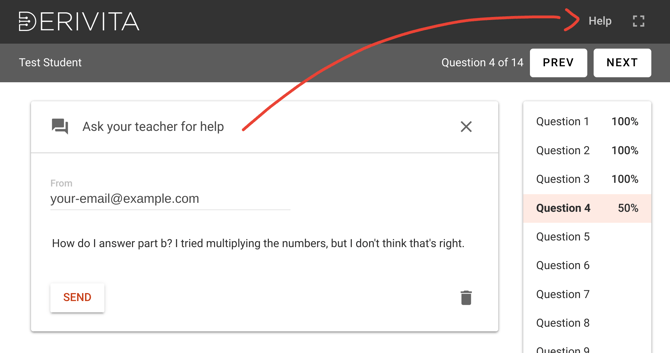
Just type a message, and Derivita will send it to your teacher, along with a link to the specific question you need help with.
What if I don't see the Help button?
Some schools don't have the Help button enabled in Derivita. If you don't see it, you can send your teacher a message through your school's learning platform (LMS), such as Canvas, Schoology, or Google Classroom.
When you contact your teacher, include:
-
The name of the assignment
-
The question number you need help with
-
A description of what you're having trouble with
-
A screenshot, if helpful
Your teacher can then help you with the question or assignment.