![derivita-logowhite (2).png]](https://support.derivita.com/hs-fs/hubfs/derivita-logowhite%20(2).png?height=25&name=derivita-logowhite%20(2).png)
What is the course dashboard?
Teachers can use the Derivita course dashboard to quickly start a SpotCheck, let students into assessments, view Analytics, and choose settings for the course: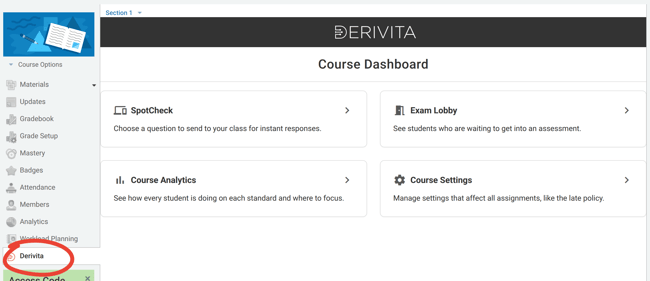
How to add the course dashboard
- In Schoology, go to App Center > My Developer Apps
- Find Derivita
If it doesn't appear for you, it was added by someone else. You'll need to have them complete these steps (or—if you have permission—you can "impersonate" them) - Click Options and choose Edit
- Scroll down to Can be installed for
- Under Courses, select Left Navigation
- Next to Left Navigation, click Overwrite Domain/URL
and enter https://homework.derivita.com/lti/course/