![derivita-logowhite (2).png]](https://support.derivita.com/hs-fs/hubfs/derivita-logowhite%20(2).png?height=25&name=derivita-logowhite%20(2).png)
What is the course dashboard?
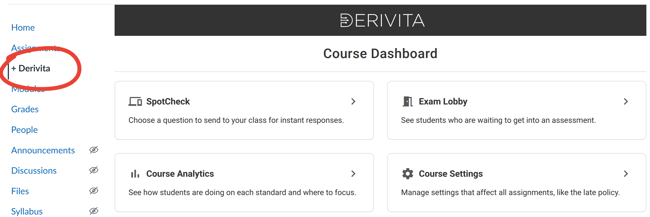
Teachers can use the Derivita course dashboard to:
-
Start a live SpotCheck on any question, without needing to add it to an assignment
-
Let students into assessments, without having to find them in Canvas
-
Quickly jump to Analytics and choose settings for the course
How to add the course dashboard
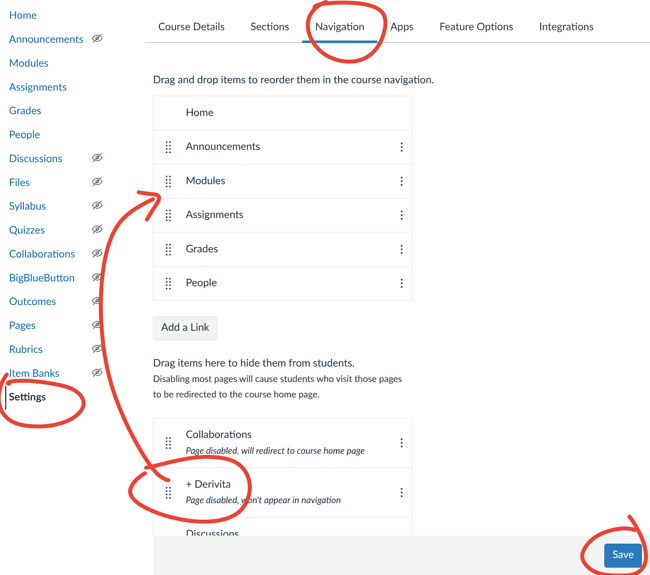
- In your Canvas course, go to Settings > Navigation
- Scroll to the bottom to find Derivita
- Click and drag to place Derivita where you’d like it
- At the bottom-right, click Save
If Derivita doesn't appear in the list of options, your Canvas admin needs to update the Derivita configuration in Canvas. They can do that in about 10 minutes by following the directions here:
How to update your Canvas configuration | Derivita Support Center